Step 1: Understanding the Properties Configuration
Let’s examine the properties.yaml file and understand what each parameter does. This configuration file controls every aspect of SHERLOCK’s behavior.
Create an annotated version of the properties file with detailed explanations
# ============================================================================
# SHERLOCK PROPERTIES FILE - DETAILED EXPLANATION
# ============================================================================
# TARGET SPECIFICATION
# -------------------
TARGETS:
TIC 305048087: # TESS Input Catalog ID - the star we want to analyze
# SHERLOCK will automatically download light curve data
# from TESS for this target
SECTORS: [2] # The sectors data to download for the selected target
# DETRENDING CONFIGURATION
# -----------------------
AUTO_DETREND_ENABLED: False # Disable automatic detrending of stellar variability
# Set to True for fast rotators or variable stars
# CAUTION: Can remove real transit signals!
INITIAL_HIGH_RMS_MASK: False # Don't apply initial high-RMS masking
# When True, masks high-noise regions in short cadence data
INITIAL_SMOOTH_ENABLED: True # Apply Savitzky-Golay smoothing filter
# When True, applies initial smoothing to short cadence data
INITIAL_HIGH_RMS_THRESHOLD: 2.0 # Threshold multiplier for high-RMS detection
# Areas with RMS > threshold*median_RMS are masked
SIMPLE_OSCILLATIONS_REDUCTION: False # Don't reduce stellar oscillations
# Useful for asteroseismology targets
INITIAL_MASK: # No initial time ranges to mask
# Format: [start_time, end_time] in TESS time
# COMMENTED TRANSIT MASK EXAMPLE:
# INITIAL_TRANSIT_MASK: # Mask known transits to search for additional planets
# - P: 5.433729 # Period in days
# T0: 1355.24981 # Transit epoch (TESS time)
# D: 120 # Transit duration in minutes
# DATA SELECTION
# -------------
EXPTIME: [120] # Use 2-minute cadence data (120 seconds)
# Options: [120] for short cadence, [1800] for long cadence
# COMMENTED AUTHOR FILTERS:
# AUTHOR: [Kepler] # Use only Kepler mission data
# AUTHOR: TESS-SPOC # Use only TESS-SPOC pipeline data
# PROCESSING PARAMETERS
# --------------------
DETRENDS_NUMBER: 10 # Number of detrend models to create
# More models = better systematics removal but slower
# Typical range: 5-12
DETREND_CORES: 6 # CPU cores for parallel detrending
# Should not exceed your system's core count
CPU_CORES: 6 # CPU cores for main processing
# Adjust based on your system capabilities
MAX_RUNS: 2 # Maximum number of transit search iterations
# Each run searches for the strongest remaining signal
# Higher values find more planets but increase false positives
# DETECTION THRESHOLDS
# -------------------
SNR_MIN: 5 # Minimum Signal-to-Noise Ratio for detection
# Lower values = more sensitive but more false positives
# Typical range: 5-8
SDE_MIN: 5 # Minimum Signal Detection Efficiency
# Statistical significance threshold
# SDE > 5 corresponds to ~99.9% confidence
# PERIOD SEARCH RANGE
# ------------------
PERIOD_MIN: 0.75 # Minimum orbital period to search (days)
# Shorter periods may be affected by systematic noise
PERIOD_MAX: 10 # Maximum orbital period to search (days)
# Limited by observation baseline and transit probability
# SIGNAL SELECTION
# ---------------
MIN_QUORUM: 0.333 # Minimum fraction of detrend models that must agree
# Higher values = more conservative candidate selection
# Range: 0.1 (liberal) to 0.8 (very conservative)
# DATA PROCESSING
# --------------
TRUNCATE_BORDERS_DAYS: 0.5 # Remove data from sector edges (days)
# Helps avoid systematic effects at sector boundaries
# Typical range: 0.5-2.0 days
Step 2: Running SHERLOCK with the Properties File
Now let’s execute SHERLOCK using our properties configuration. This will search for transit signals in the TIC 305048087 light curve.
SHERLOCK Command:
python3 -m sherlockpipe --properties properties.yaml
This command will:
Download TESS data for TIC 305048087
Create 10 different detrend models
Search for transit signals in each model
Apply quorum voting to select reliable candidates
Generate comprehensive reports and plots
# Execute SHERLOCK search
!python3 -m sherlockpipe --properties /home/martin/workspace/ph/SHERLOCK/docs/source/_static/properties.yaml > sherlock.log
/home/martin/anaconda3/envs/sherlock311/lib/python3.11/site-packages/lightkurve/config/__init__.py:119: UserWarning: The default Lightkurve cache directory, used by download(), etc., has been moved to /home/martin/.lightkurve/cache. Please move all the files in the legacy directory /home/martin/.lightkurve-cache to the new location and remove the legacy directory. Refer to https://docs.lightkurve.org/reference/config.html#default-cache-directory-migration for more information.
warnings.warn(
^^^^^^^^^^^^^^^^^^^^^^^^^^^^^^
...
results_dir = '/home/martin/workspace/TIC305048087_[2]'
Examining Planet Candidates
After running SHERLOCK, the tool searches for transit signals across multiple detrend models and identifies potential planet candidates. The list of resulting files should be something similar to:
Directories:
1/ and 2/: These numbered directories contain results for each detection run. SHERLOCK performs multiple runs (based on MAX_RUNS in your properties.yaml), with each run focusing on finding additional signals after masking previously detected ones.
detrends/: Contains plots and data of the different detrending methods applied to the light curve. SHERLOCK creates multiple detrend models (10 in your case, as specified in properties.yaml).
flux_diff/: Includes visualizations showing the difference in flux between pixels to help identify source contamination.
fov/: Contains “Field of View” images showing the target star and nearby stars that might contaminate the signal.
periodicity/: Contains periodogram analysis results to identify periodic signals in the data.
tpfs/: Target Pixel Files directory with pixel-level data and visualizations.
Files:
apertures.yaml: Defines the photometric aperture(s) used for extracting the light curve.
candidates.csv: Summary table of all planet candidates detected across all runs, with their key parameters.
lc_0.csv through lc_9.csv: The 10 different detrended light curves (matching DETRENDS_NUMBER in your properties.yaml).
lc.csv: The original extracted light curve before detrending.
lc_data.csv: Comprehensive light curve data including quality flags and other metadata.
params_star.csv: Contains stellar parameters (radius, mass, temperature, etc.) used for planet characterization.
properties.yaml: A copy of the configuration file used for this analysis.
TIC305048087_[2]_candidates.log: Log file specifically for candidate detection information.
TIC305048087_[2]_report.log: The main report log with comprehensive analysis information.
transits_stats.csv: Statistical information about the detected transit signals.
Below, we’ll load and display the search results from the log file to examine what planet candidates were found during the detection process.
The log shows important information for each candidate, including:
Period (days)
Transit depth (in parts per thousand)
Signal-to-noise ratio (SNR)
Signal detection efficiency (SDE)
Duration of the transit (minutes)
Border score (quality indicator)
Planet radius estimation (in Earth radii)
Habitability zone classification
TIC305048087_[2]_candidates.log
The content of the candidates log contains two lines for TOI-237.01 and TIC 305048087.02
import sys
import platform
import os
from IPython.display import HTML
# Function to load and display the entire log file in a scrollable container
def display_log_file(log_path, max_height=500):
try:
with open(log_path, 'r') as file:
log_content = file.read()
# Create scrollable div with the log content
html = f"""
<div style="max-height:{max_height}px; overflow:auto; border:1px solid #ccc; padding:8px; font-family:monospace; font-size:0.9em;">
<pre>{log_content}</pre>
</div>
"""
return HTML(html)
except Exception as e:
return f"Error loading log file: {str(e)}"
display_log_file(results_dir + '/TIC305048087_[2]_candidates.log')
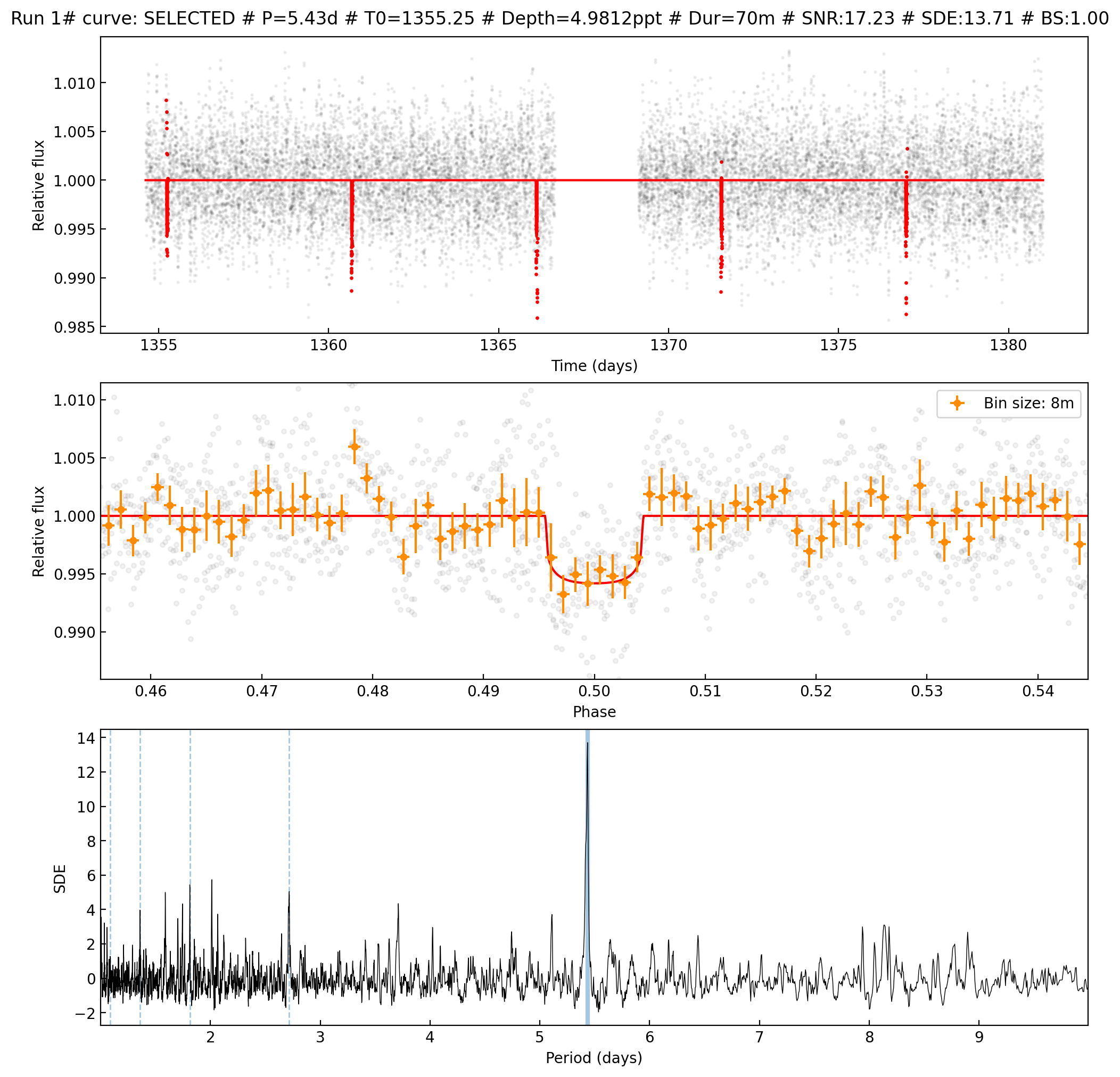
Listing most promising candidates for ID TIC305048087_[2]: Detrend no. Period Per_err Duration T0 Depth Depth_err Depth_sig SNR SDE Border_score Matching OI Harmonic Planet radius (R_Earth) Rp/Rs Semi-major axis Habitability Zone 10 5.4348 0.01703 69.69 1355.25 4.981 0.266 18.702 17.23 13.71 1.00 TOI 237.01 - 1.62846 0.07108 0.03424 I 8 1.7456 0.00337 49.36 1355.58 2.263 0.170 13.278 11.07 6.52 1.00 - 1.09763 0.04609 0.01606 I
For a better understanding of the selected signals, we can plot their best matches looking into the /1 and /2 directories:
TOI 237.01 selected signal
from PIL import Image
from IPython.display import display
# Open and display the image
img = Image.open(results_dir + '/1/Run_1_SELECTED_10_TIC305048087_[2].png')
display(img)
TIC 305048087.02 selected signal
from PIL import Image
from IPython.display import display
# Open and display the image
img = Image.open(results_dir + '/2/Run_2_SELECTED_8_TIC305048087_[2].png')
display(img)
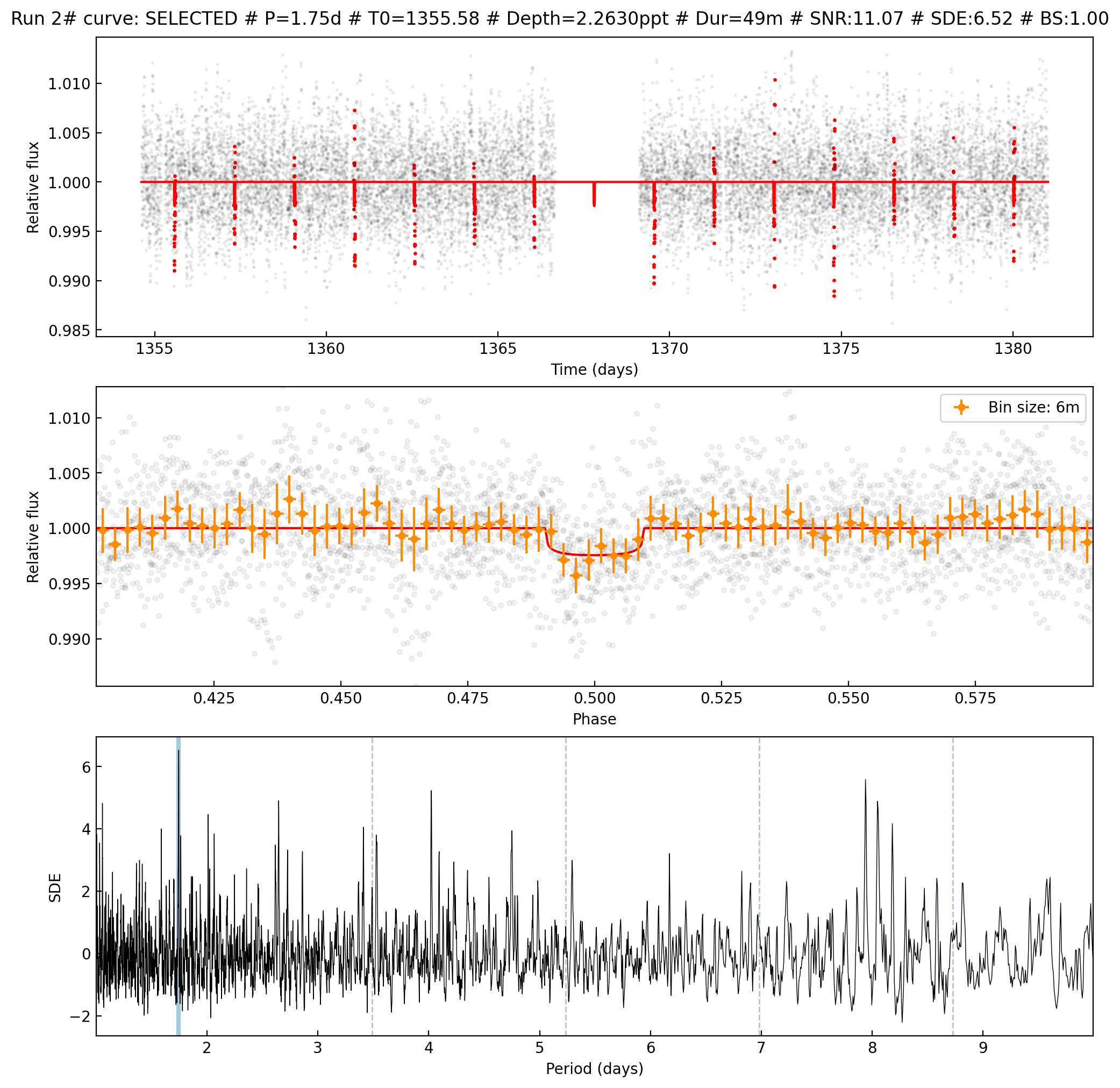
Even when this last signal doesn’t show a really good power spectrum, its shape is very promising and we will keep it for further analysis.
Step 3: Selected signals bayesian fit
We are interested in understanding the two selected signals. To examine them or prepare follow-up programs, we first need to run a bayesian fit to refine the transit parameters. SHERLOCK has a built-in fit module that is very easy to run. We will run it for the two signals:
# Moving to sherlock target directory
os.chdir(results_dir)
# Execute fit for TOI 237.01
!python3 -m sherlockpipe.fit --candidate 1 --cpus 6 > fit1.log
# Execute fit for TIC 305048087.02
!python3 -m sherlockpipe.fit --candidate 2 --cpus 6 > fit2.log
/home/martin/anaconda3/envs/sherlock311/lib/python3.11/site-packages/lightkurve/config/__init__.py:119: UserWarning: The default Lightkurve cache directory, used by download(), etc., has been moved to /home/martin/.lightkurve/cache. Please move all the files in the legacy directory /home/martin/.lightkurve-cache to the new location and remove the legacy directory. Refer to https://docs.lightkurve.org/reference/config.html#default-cache-directory-migration for more information.
warnings.warn(
100%|███████████████████████████████████████████| 24/24 [00:00<00:00, 63.14it/s]
100%|█████████████████████████████████████████████| 5/5 [00:00<00:00, 25.16it/s]
100%|███████████████████████████████████████| 1000/1000 [01:00<00:00, 16.60it/s]
100%|███████████████████████████████████████| 5000/5000 [04:37<00:00, 18.00it/s]
100%|█████████████████████████████████████████████| 2/2 [00:04<00:00, 2.34s/it]
100%|███████████████████████████████████████████| 10/10 [00:41<00:00, 4.14s/it]
100%|██████████████████████████████████████████| 24/24 [00:00<00:00, 106.19it/s]
100%|█████████████████████████████████████████████| 5/5 [00:00<00:00, 23.87it/s]
15020it [10:26:14, 2.50s/it, batch: 5 | bound: 30 | nc: 1 | ncall: 385300 | eff(%): 3.757 | loglstar: 4017.576 < 4024.635 < 4022.855 | logz: 4013.690 +/- 0.095 | stop: 0.974]
100%|███████████████████████████████████████████| 24/24 [00:04<00:00, 4.84it/s]
100%|█████████████████████████████████████████████| 5/5 [00:04<00:00, 1.12it/s]
/home/martin/anaconda3/envs/sherlock311/lib/python3.11/site-packages/lightkurve/config/__init__.py:119: UserWarning: The default Lightkurve cache directory, used by download(), etc., has been moved to /home/martin/.lightkurve/cache. Please move all the files in the legacy directory /home/martin/.lightkurve-cache to the new location and remove the legacy directory. Refer to https://docs.lightkurve.org/reference/config.html#default-cache-directory-migration for more information.
warnings.warn(
100%|███████████████████████████████████████████| 26/26 [00:00<00:00, 29.69it/s]
100%|███████████████████████████████████████████| 14/14 [00:00<00:00, 19.75it/s]
100%|███████████████████████████████████████| 1000/1000 [00:46<00:00, 21.56it/s]
100%|███████████████████████████████████████| 5000/5000 [04:01<00:00, 20.67it/s]
100%|█████████████████████████████████████████████| 2/2 [00:03<00:00, 1.77s/it]
100%|█████████████████████████████████████████████| 9/9 [00:28<00:00, 3.14s/it]
100%|███████████████████████████████████████████| 26/26 [00:00<00:00, 43.85it/s]
100%|███████████████████████████████████████████| 14/14 [00:00<00:00, 20.71it/s]
13809it [55:33, 4.14it/s, batch: 5 | bound: 30 | nc: 1 | ncall: 353592 | eff(%): 3.778 | loglstar: 7729.063 < 7736.201 < 7734.337 | logz: 7728.735 +/- 0.074 | stop: 0.991]
100%|███████████████████████████████████████████| 26/26 [00:12<00:00, 2.14it/s]
100%|███████████████████████████████████████████| 14/14 [00:11<00:00, 1.17it/s]
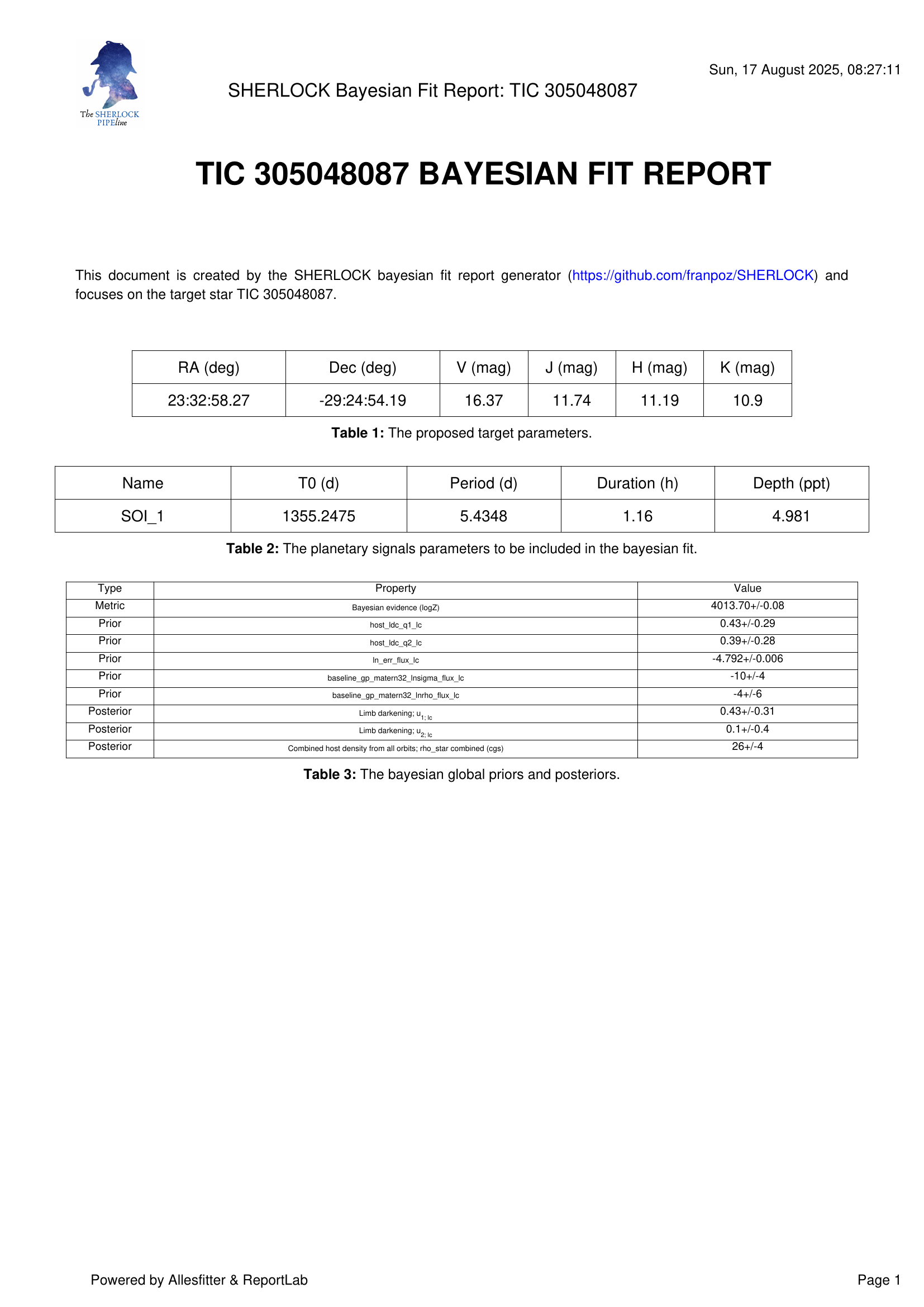
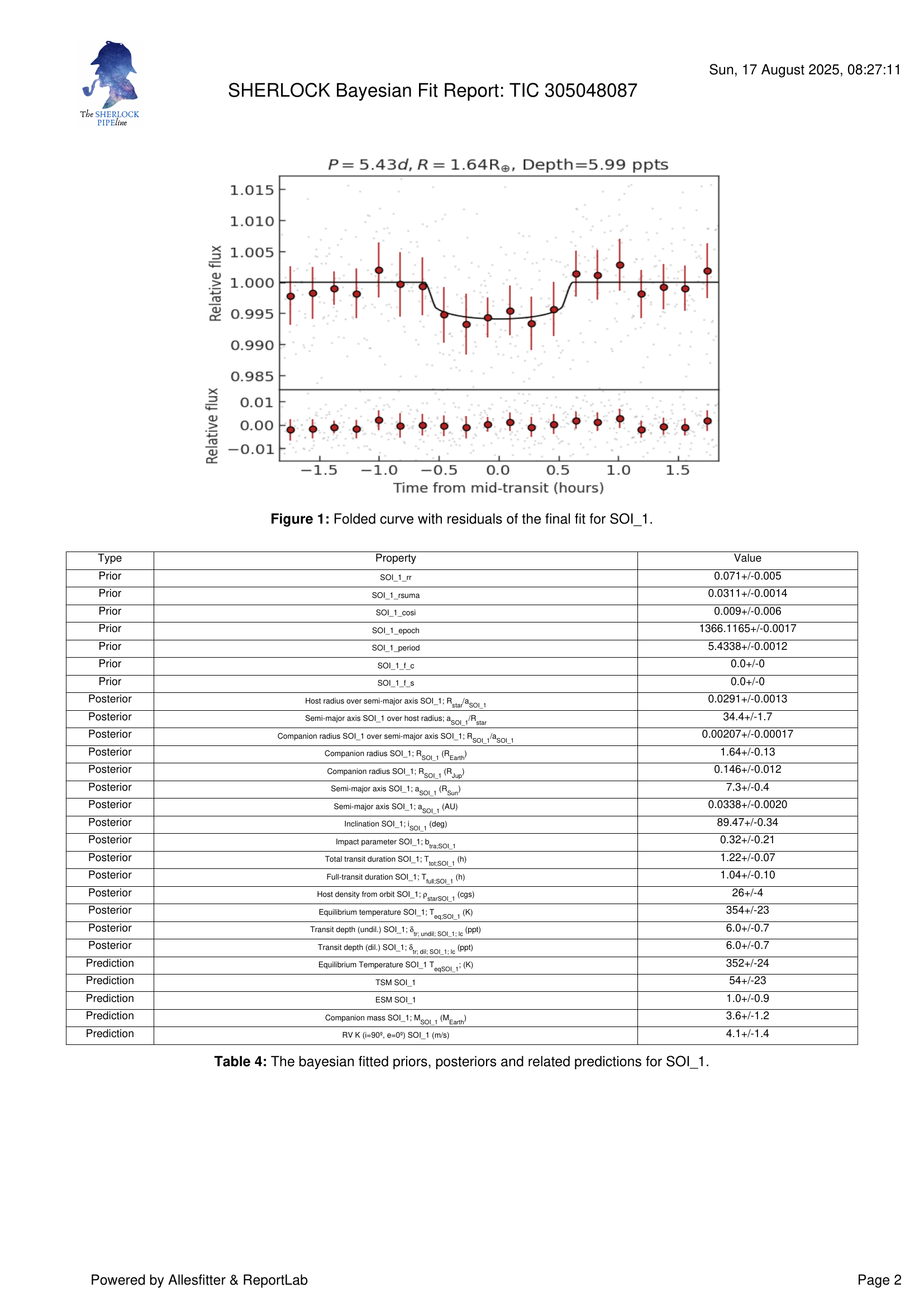
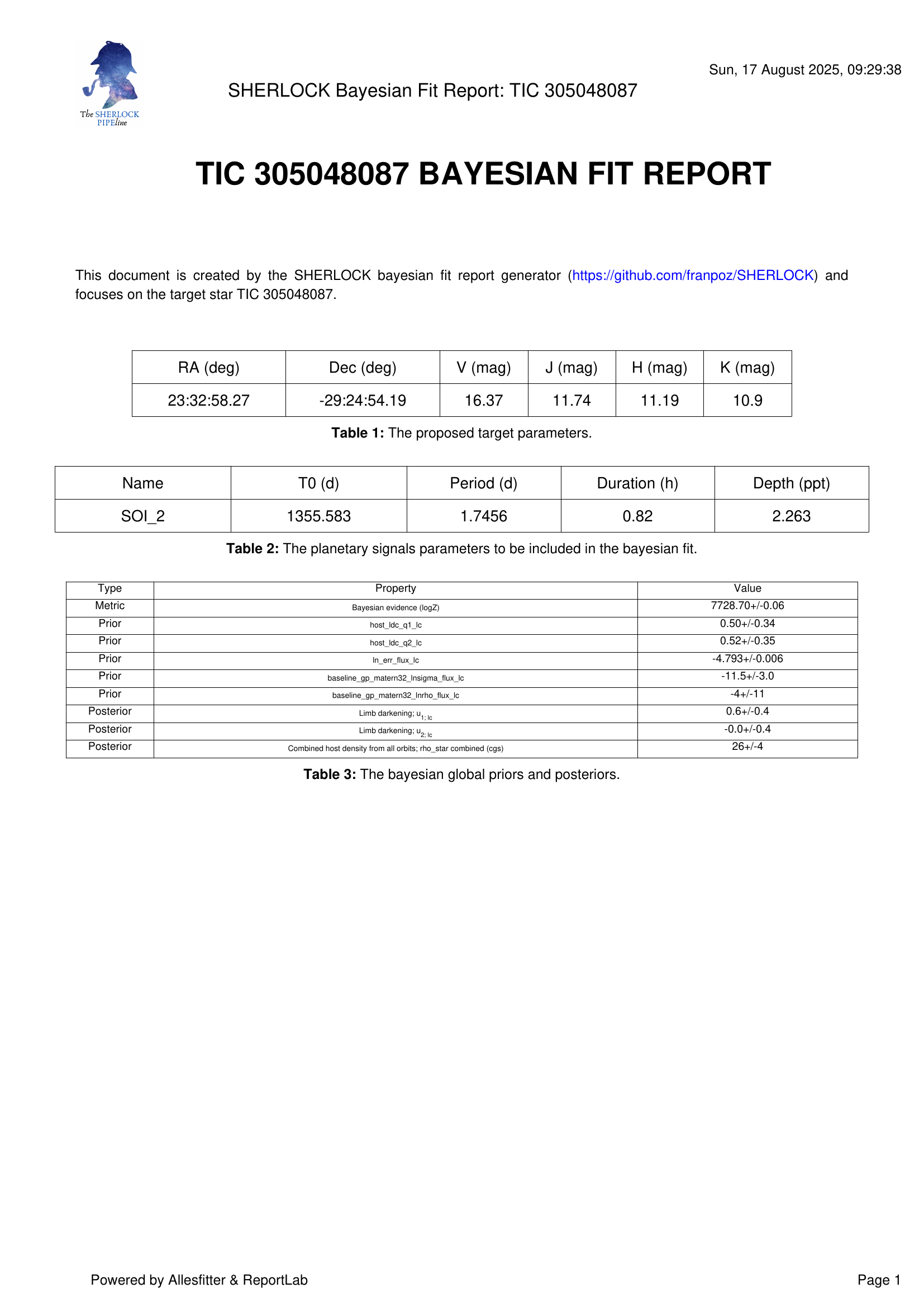
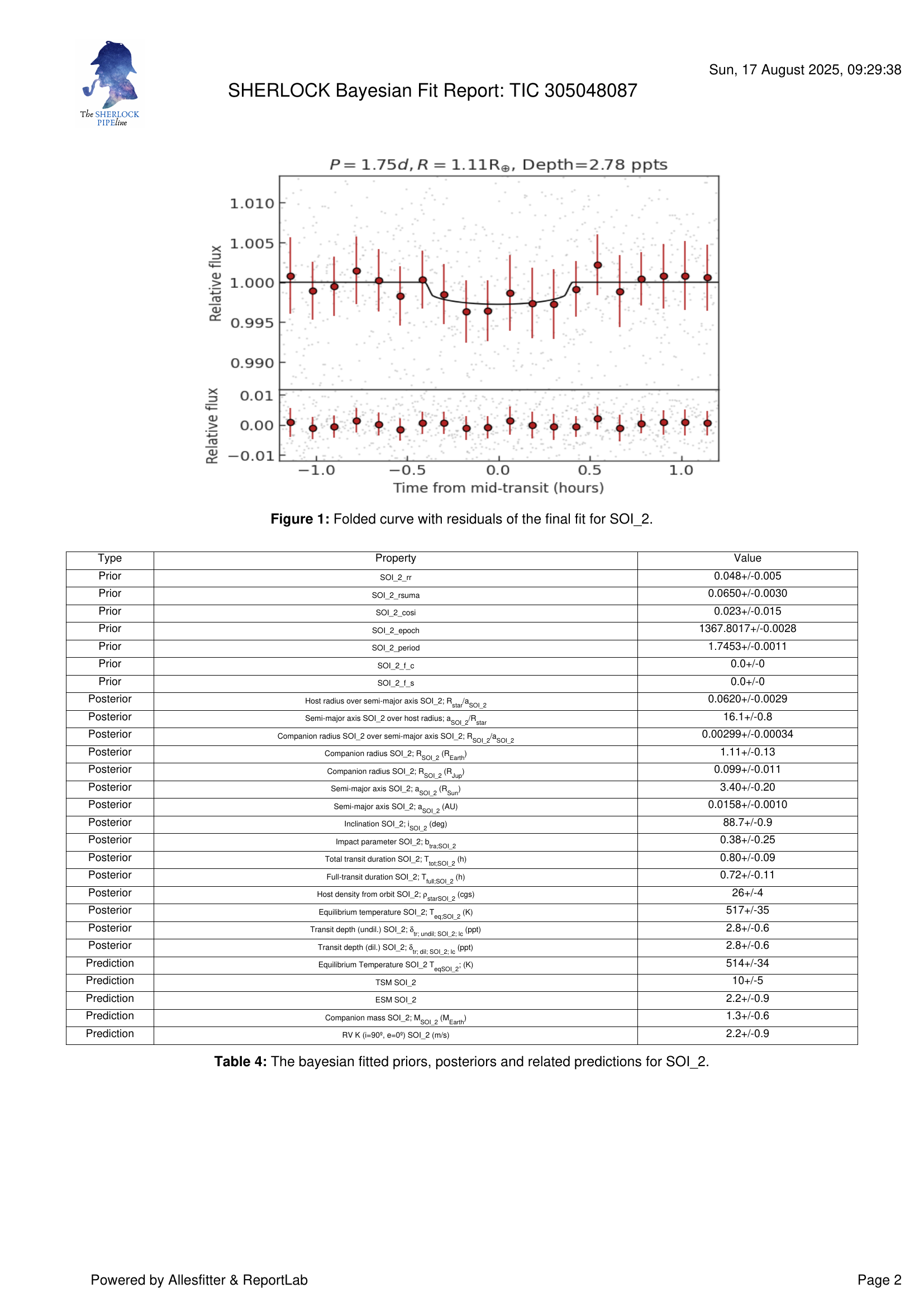
There are now two new directories fit_[1] and fit_[2], each containing the results of the two bayesian fits. Under each directory there are many files for deep inspection by the user. However, SHERLOCK compiles a summary of the results in each TIC 305048087_fit.pdf file.
TOI 237.01 fit report
!python3 -m pip install pdf2image
from pdf2image import convert_from_path
from IPython.display import display, Image
import matplotlib.pyplot as plt
# Convert PDF pages to images
pages = convert_from_path(results_dir + '/fit_[1]/TIC 305048087_fit.pdf', 200) # 200 DPI resolution
# Display each page as an image
for i, page in enumerate(pages):
print(f"Page {i+1}")
display(page) # Or use plt.imshow(page) for more control
Requirement already satisfied: pdf2image in /home/martin/anaconda3/envs/sherlock311/lib/python3.11/site-packages (1.16.2)
Requirement already satisfied: pillow in /home/martin/anaconda3/envs/sherlock311/lib/python3.11/site-packages (from pdf2image) (11.2.1)
Page 1
Page 2
TIC 305048087.02 fit report
from pdf2image import convert_from_path
from IPython.display import display, Image
import matplotlib.pyplot as plt
# Convert PDF pages to images
pages = convert_from_path(results_dir + '/fit_[2]/TIC 305048087_fit.pdf', 200) # 200 DPI resolution
# Display each page as an image
for i, page in enumerate(pages):
print(f"Page {i+1}")
display(page) # Or use plt.imshow(page) for more control
Page 1
Page 2
Step 4: Candidates vetting
Having obtained robust parametric models for both planetary candidates through the fitting procedure, we can now proceed to quantitative signal validation. While the validation metrics can be computed without prior fitting, utilizing the derived orbital and physical parameters significantly enhances the accuracy of the vetting diagnostics and provides essential context for signal interpretation.
SHERLOCK’s validation module provides a streamlined implementation of standard vetting procedures. The module can be executed via straightforward command-line operations, with separate processes required for each candidate to ensure independent validation. The following commands initiate the validation procedure for each of our detected signals:
# Vetting for TOI 237.01
!python3 -m sherlockpipe.vet --candidate 1 --ml --cpus 4 > vet1.log
# Vetting for TIC 305048087.02
!python3 -m sherlockpipe.vet --candidate 2 --ml --cpus 4 > vet2.log
2025-08-17 09:31:14.452131: E external/local_xla/xla/stream_executor/cuda/cuda_fft.cc:467] Unable to register cuFFT factory: Attempting to register factory for plugin cuFFT when one has already been registered
WARNING: All log messages before absl::InitializeLog() is called are written to STDERR
..........
Upon completion of the analysis, the target directory now contains two vetting subdirectories: vet_1 and vet_2. The raw data from the vetting process is preserved in CSV format to facilitate further analysis and custom applications. SHERLOCK synthesizes the vetting results into two comprehensive reports: TIC 305048087_transits_validation_report.pdf and TIC 305048087_transits_validation_report_summary.pdf.
The comprehensive report presents a complete analysis of all detected transit events, while the summary report provides a representative subset of transit profiles—specifically the transit with depth closest to the mean, the maximum depth transit, and the minimum depth transit—thereby offering an efficient overview of the signal characteristics without exhaustive event-by-event documentation.
The validation reports are displayed below.
TOI 237.01 vetting report
import base64
from IPython.display import HTML
with open(f"{results_dir}/vet_1/TIC 305048087_transits_validation_report_summary.pdf", "rb") as f:
encoded_pdf = base64.b64encode(f.read()).decode("utf-8")
data_uri = f"data:application/pdf;base64,{encoded_pdf}"
# HTML block with both options
html = f"""
<ul>
<li><a href="{data_uri}" download="toi237-01report.pdf">TOI 237.01 vetting report</a></li>
</ul>
"""
display(HTML(html))